
Features
Everything you need to fill shifts — and the flexibility to follow your workforce rules.
BookStaff combines automated shift filling with configurable workforce rules, allowing organizations to determine who receives opportunities, how shifts are distributed, and how departments, qualifications, workforce groups and locations are managed — all from one platform.

The product story
01
Create
02
Distribute
03
Configure
04
Oversee
05
Know
06
Communicate
07
Measure
01 — Create
01
Shift Posting
Create shifts in seconds — a single vacancy, a recurring block, or a full run from a saved template. Every posting carries the requirements and context an employee needs before they accept.
Required Qualifications
Set the qualifications, certifications or requirements needed for each shift so opportunities only reach eligible employees.
Shift Types and Incentives
Identify normal, last-minute, overtime and other organization-defined shift types.
Single and Recurring Shifts
Post one vacancy, or set a pattern once and let it repeat.
Templates
Your most frequently posted shifts, one click away.
Departments and Locations
Post to the right team, unit or site every time.
Custom Notes
What employees see, and what stays internal to the office.
02 — Distribute
02
Smart Shift Distribution
Post once and let BookStaff determine who should receive the opportunity based on your organization's configured workforce rules.
Smart Notifications
Set the qualifications, certifications or requirements needed for each shift so opportunities only reach eligible employees.
Configurable Awarding
Use first-come-first-served distribution
or configure workforce rules for
environments requiring additional
awarding logic.
Real-Time Updates
Accepted, pending, cancelled and
available shifts update across the
platform as changes happen.

In the field
Set up once, then the rules do the routing for you.
03 — Configure
03
Your workforce. Your rules.
Every organization fills shifts differently. BookStaff can be configured around the workforce structure, eligibility requirements and distribution rules that determine who should see — and ultimately receive — an open shift.
Configurable Workforce Rules
Qualifications
Control shift eligibility using required licenses, certifications, skills or other qualifications.
Departments
Route opportunities to the appropriate department, unit or workforce group.
Employment Status
Configure Full-Time, Part-Time, Casual, Temporary, Agency, Contract or other employment categories.
Seniority
Support workforce environments where seniority influences shift distribution.
Union and Non-Union Groups
Separate workforce rules for different bargaining units, unions or non union employees.
Posting Stages
Move opportunities through configured employee groups or eligibility stages.
Overtime Rules
Help control when and how overtime opportunities are distributed.
Locations and Sites
Ensure employees only receive opportunities for locations they're eligible to work.
04 — Oversee
04
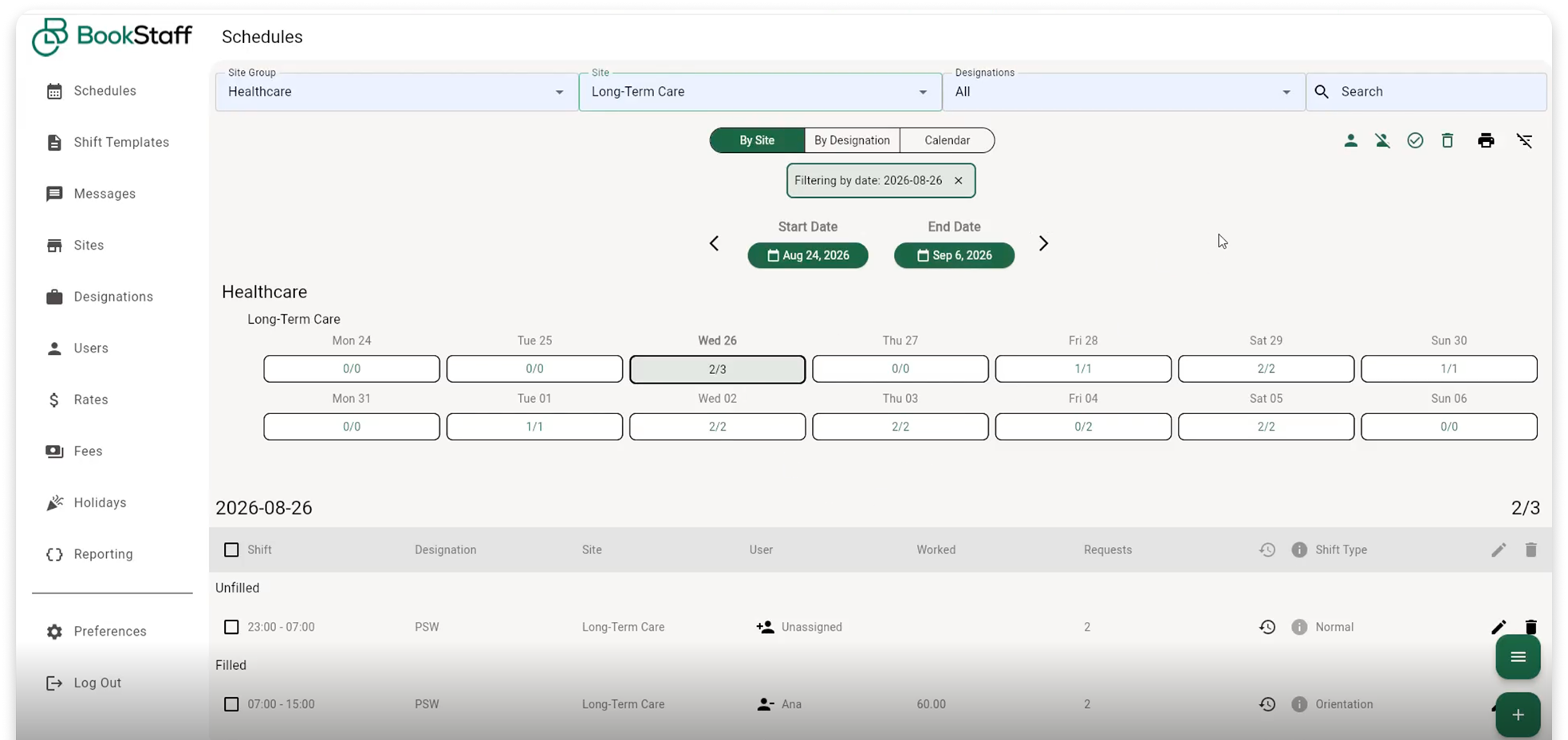
Scheduling Dashboard
One screen that answers the only question that matters at 7am: what is covered, and what isn't.
Calendar, daily, weekly and monthly views
Zoom from one morning to a whole month without changing screens.
Filled and unfilled tracking
A live count on every day, so gaps are obvious at a glance.
Pending approvals
Anything waiting on a manager sits in one queue.
Cancelled shifts
Cancellations are logged, not lost, and can be reposted instantly.
Overtime Visibility
Identify overtime shifts and monitor overtime activity within
Departments and locations
Filter down to one unit, or take in every site at once.
05 — Know
05
Employee Profiles
Employee information is what makes accurate eligibility possible. Every profile holds the details your configured workforce rules read from.
Required Qualifications
Set the qualifications, certifications or requirements needed for each shift so opportunities only reach eligible employees.
Shift Types and Incentives
Identify normal, last-minute, overtime and other organization-defined shift types.
Single and Recurring Shifts
Post one vacancy, or set a pattern once and let it repeat.
Templates
Your most frequently posted shifts, one click away.
Departments and Locations
Post to the right team, unit or site every time.
Custom Notes
What employees see, and what stays internal to the office.
06 — Communicate
06
Messaging
Send operational updates, reminders and workforce communications through the same platform employees already use to manage their shifts — reducing reliance on personal text threads and disconnected communication channels.
Smart Notifications
Set the qualifications, certifications or requirements needed for each shift so opportunities only reach eligible employees.
Configurable Awarding
Use first-come-first-served distribution
or configure workforce rules for
environments requiring additional
awarding logic.
Real-Time Updates
Accepted, pending, cancelled and
available shifts update across the
platform as changes happen.
07 — Measure
07
Turn scheduling activity into workforce insight.
See the patterns behind your coverage — not just today's schedule. BookStaff reporting helps organizations understand vacancies, shift activity, cancellations, coverage and workforce utilization.
Vacancies
What is still uncovered, and where.
Shift activity
Posting and acceptance patterns over time.
Cancellations
Patterns by team, site or period.
Coverage
How reliably shifts are being filled.
Workforce utilization
Where hours are going across your workforce.
Permissions can be configured around your organization's operational structure.
The right access for every role.
Different users receive the access and information appropriate to their responsibilities.
Administrators
Configure users, workforce rules, reporting, scheduling and organization settings.
Managers
Post and manage shifts, oversee departments, review schedules and access approved operational information.
Employees
Receive eligible opportunities, accept shifts, view schedules and receive workforce communications.
Mobile access
No new devices. No complicated setup.
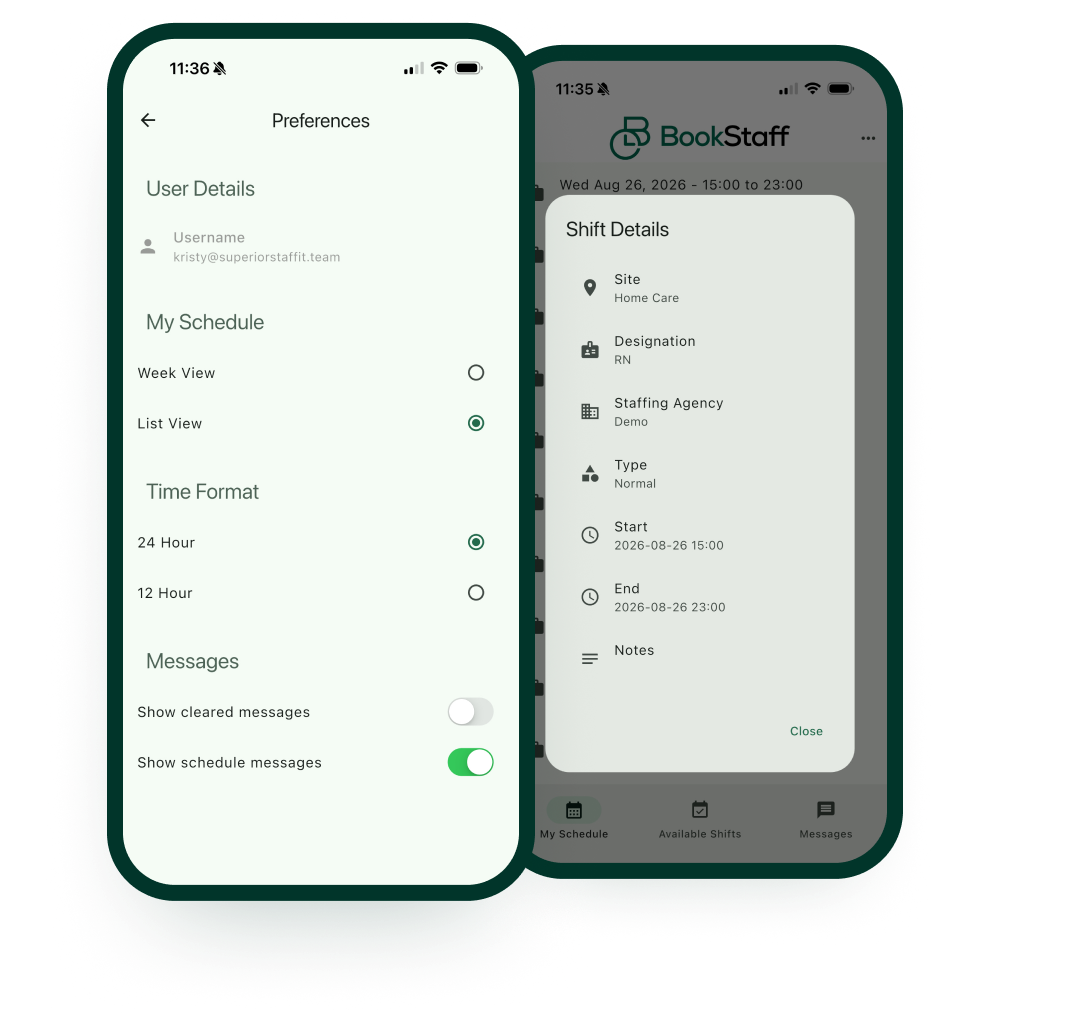
Access BookStaff across mobile, tablet and desktop. Office teams can manage scheduling through the browser while employees can access shift opportunities and schedules from their phone.
See BookStaff configure your workforce.
A personalized walkthrough using your own departments,
qualifications and distribution rules — so you can see how
BookStaff would fit your operation.
Request Pricing →